Digital Literacy OnlineStudents often tell me - I read it on the Internet it must be true! The trust they place in the top results of their searching can be misguided. They need to develop critical thinking skill to validate and select the enormous amount of information available to them. The internet is the most powerful, convenient and potentially manipulative medium ever invented and is continually growing.
FACT BUSTERS: 2,000,000,000 (two billion) –of Google searches daily In 2008 Google reached a new milestone one trillion web pages There has been a 10 000% increase in information from 2003-2009 For students it is dominant medium and place they go to for information. In a world of information overload, it is vital for students to not only find information but also determine its validity and appropriateness. To be digitally literate our students need to understand how searches work and have the ability to analyse and evaluate digital information. Our information literacy material demystifies the process of finding and validating online information. 2011 Horizon report states that Sense-making and the ability to assess the credibility of information are paramount. WHERE DOES IN FIT IN CURRICULUM? Some examples of where this is required in the Australian Curriculum are: · ICT as a General Capability. One key component is Investigate where students select and evaluate data and information and apply criteria to verify the integrity of data and information and their sources, for example for usefulness, credibility, reliability, validity, relevance, bias, timeliness, author, date. · Critical and creative thinking as a General Capability. Students are required learn to generate and evaluate knowledge, ideas and possibilities, and employ these skills when seeking new pathways or solutions. · Historical Skills with the History discipline area. Children are required to analyses and use sources. It is important when researching online that the children have a process that could be as simple as:
GRAMMAR OF INTERNET: Therefore the ability to understand the grammar of the internet and critically think about information is an essential skill. This goes beyond searching skills and reading the contents of a web page. Three key Grammar elements on the internet are: KEY ONE Knowing how to read a URL When reading the url-3 questions Do you recognise domain name? A domain name can sometimes provide clues about the quality of information of a site or tell you what a site is about. What is the extension in the domain name? Could put tricky extensions up to see if they know…. A great site to get students to use is ROOT ZONE DATABASE or Country Codes http://www.iana.org/domains/root/db/ or http://goes.gsfc.nasa.gov/text/web_country_codes.html This is an important component because if students are search for sources from an Earthquake in NZ, then they could look for the most relevant sites from that specific country. Are you on a personal page? A personal page is a web site created by an individual. The web site may contain useful information, links to important resources and helpful facts, but sometimes these pages offer highly biased opinions. The presence of a name in the URL such as jdoe and a tilde ~ or % or the word users or people or members frequently means you are on a personal web site. Even if a site has the extension, .edu, you still need to keep a look out for personal pages. Case in point is this web site previously available and published by a professor at Northwestern University: http://pubweb.northwestern.edu/~abutz/di/intro.html A simple scaffold for children to validate Web materials could be Alan Novembers 4 step process called real. KEY TWO Finding out who published a website and it is current FINDING OUT WHOSE WEBSITE: You can often find the owner or publisher of a web site by using the EasyWhois? http://www.easywhois.com/ It is a Database. It is sometimes helpful to know who publishes the information you are reading. Show with example: Harry Potter: www.harrypotter.com or The Pacific Northwest Tree Octopus: http://zapatopi.net/treeoctopus.html In bookstores, we only see the finished product of a body of work, but the Internet allows us to explore a collection of drafts. We can chart the progress or history of a web site thanks to the Wayback Machine. The Wayback Machine: www.archive.org allows you to browse through 30 billion web pages archived from 1996 to a few months ago. To use this site type in the URL of a site or page of which you would like to research, and click the Take Me Back button. Once you have conducted your search, select from the archived dates available. KEY THREE Understanding LINKS When children search with one search engine … they don’t normally change. They also believe the top hits are the most important. But do they understand how they work.The links within a site will also allow students to build a map of related commentary, where they can critical evaluate sites. Students need to be aware how the web generates results, where it is influenced by popularity instead of value. This will allow them to question the information they find and cross-reference information and look for hidden bias. Examining a web site's external links is an important step in validating Internet information. SEARCH ENGINES |
 |
 |
 |
 |
 |
 |
 |
 |
 |
 |

|

|
|
|

|

|

|
|
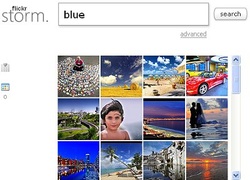
Image Search Sites
 |
 |
 |
 |
 |
 |

|

|
Data/Notes Gathering Tools
LinoItLino is an online web sticky note service that can be used to
post memos, to-do lists, ideas, links, videos and photos anywhere on an online web canvas. A similar site is http://www.stixy.com/ |

|
SpiderScribeSpiderScribe is an online mind mapping and brainstorming tool.
It lets you organize your ideas by connecting notes, files, calendar events, etc. in free-form maps. You can collaborate and share those maps online. |

|
PoppletPopplet provides users a visual communication platform where you
are able to post images, post videos, curate links, think visually, sketch ideas, and share and collaborate with others. |

|
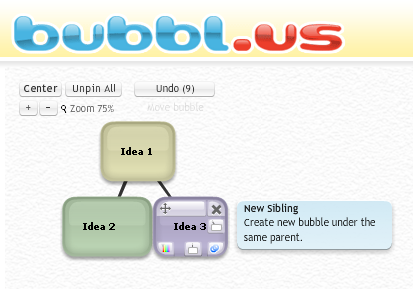
Bubbl.usBrainstorm online with bubbl.us. Easily create colorful mindmaps to print or share with others
|
|
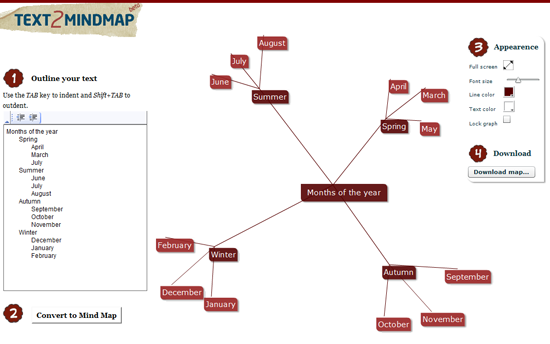
Text2MindmapText 2 Mind Map is a web application that creates a mind map out of a list of words
|
|
EvernoteCapture anything- all of your notes, web clips, files and images. Save your ideas, things you like, things you hear, and things you see. Access anywhere as it works with nearly every computer, phone and mobile device out there. Find things fast as you search by keyword, tag or even printed and handwritten text inside images.
|

|
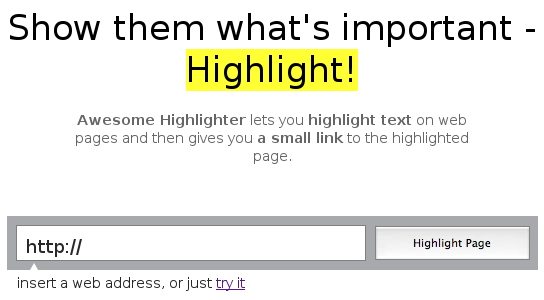
Awesome HighlighterAwesome Highlighter lets you highlight text on web pages and then gives you a small link to the highlighted page.
|
|
BibmeBibMe is an automatic bibliography maker that auto-fills. It's the easiest way to build a works cited page. And it's free.
Search for a book, article, website, or film, or enter the information yourself. Add it to your bibliography. Download your bibliography in either the MLA, APA, Chicago, or Turabian formats and include it in your paper. It's that easy! |

|
Site HooverSitehoover allows you to create a homepage of your own, containing all your favorite websites. The actual distribution and presentation of the websites is that of thumbnails that take a SpeedDial form.
|
|
ScoopItScoop.it is a Content Curation tool that allows you to bring together a collection of websites, articles, blogs and other social media about a topic of your choice. This is very useful when you are exploring a topic for the first time. You can harvest, collect (or curate - this is the latest term) a wide range of resources before you start your deep research. You can also see what information other people are collecting on that topic.
|

|
|
Pinterest is an online pinboard. This pinboard-style social photo sharing website that allows users to create and manage theme-based.
|

|
PearltreePearltrees is a social curation tool. It lets you organize, discover and share the stuff you like on the web.
|
|